
GIS Geographical Information System is the advance tool for surveying and other data collection fields at the surface of land So 3Ds Plan Orbits Tech presented the learning course GIS Course in Rawalpindi Islamabad Pakistan or from any where.
Course Details.
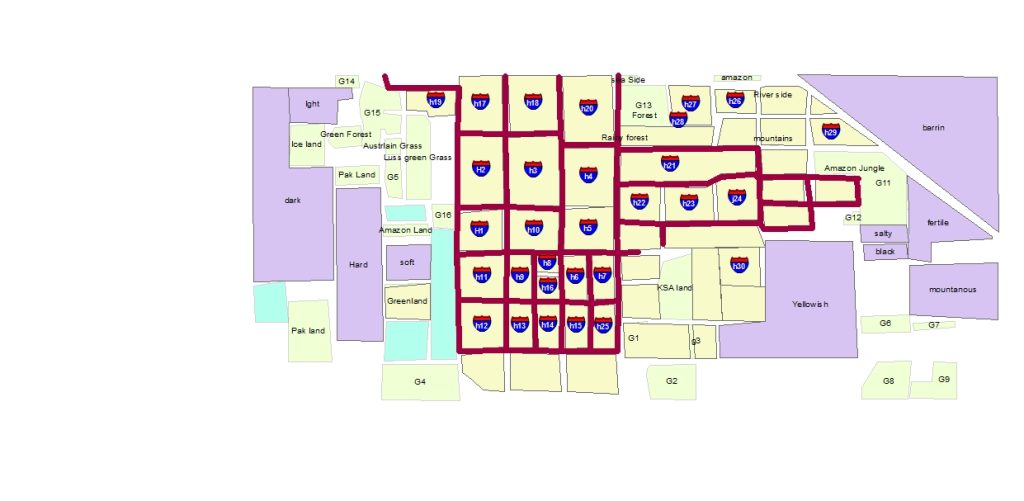
First Digitalization of Maps at base plan.
Image data gaining from Google Earth and Geo referencing in Arc map with original coordinates.
With the help of Vector data Digitalize map through Line, Rectangle, Circle, Ellipse etc. GIS Course in Rawalpindi Islamabad Pakistan
Town Planning.
Arc map GIS help in the field of town planning and plot designing With Road Canal and Landscaping Designs.
If Details work of Road require than also use Civil 3d Software.
First Step Planning in GIS Arc map.
Topography
Topology is another unique feature of topography. When two layers are created at a same place At top layer rule is apply with the help of topology.
Remote Sensing
The data receiving from satellite or web and geo referring it at projection Before working.
After this we have the opportunity to complete all the project according to available information.
Geocoding and Addresses
Every Vector has his own specification point according to coordinates.
Because of the behalf of this Position point Address can be made and as needed we can find out the position of object.
Symbology
Symbology means symbol of object as like tree, Vehicle, Building, Water etc. Show at the project and map Every symbol its own meaning according to color and map nature with text or annotation style.
Contouring map
Contouring map can be generated with the help of point data and elevation level of surfaces. Contouring shows rise and slope of site area, Annotation and Labeling are displaying the contour levels and contour lines offset.
3D Analyst
This is Extension of ArcMap. in 3d Analyst Extrude the vector data according to height of element, Lines and point levels of elevation accurately visible at screen and raster data set can be created. GIS Course in Rawalpindi Islamabad Pakistan.
Therefore , we have to use Arc Globe for advance presentation which is also a Arc map extension.
Outline GIS Course.
First download image for base map purpose.
Second Add control points at all corners of image with coordinates.
Therefore , now georeferencing done.
So you have to position digitalize the map with shape files.
The attribute table open and calculate area or length.
Secondly add the label of shape files to map and adjust their with scale.
Finally display that’s label at their shape files.
So now added geocoding and addresses.
Therefore , make project shape file creations.
Because of Geodatabase work , working in feature classes.
Topology with Geodatabase and feature data set.
Added the pathways in the maps even with point data.
Point data can be import from Excel file.
Any point data easily export in excel.
Point table insert in map with shape file.